
Chapter Text
Trying to figure out how to post images on Ao3 can be pretty difficult. So here is a simple, easy tutorial to help you out.
(TLDR at bottom of page)
Getting Started
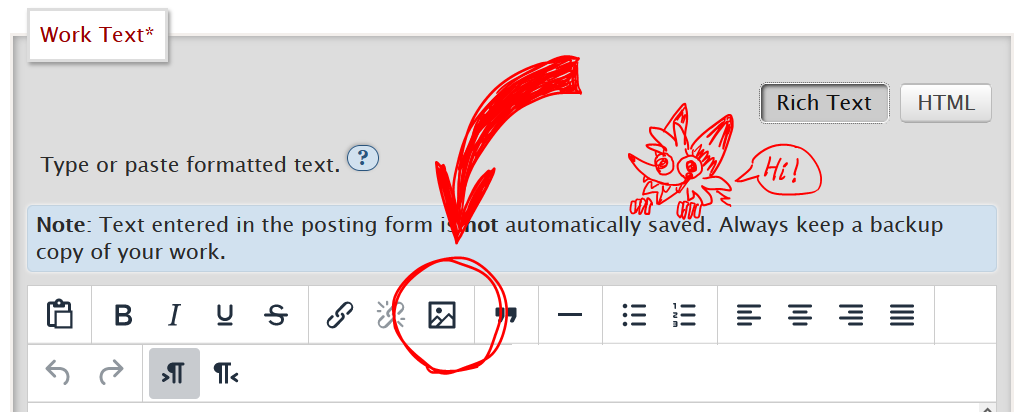
The easiest, quickest way to put an image into your work, is by pressing this button in the Rich Text editor.
Pressing it will show you this little window.
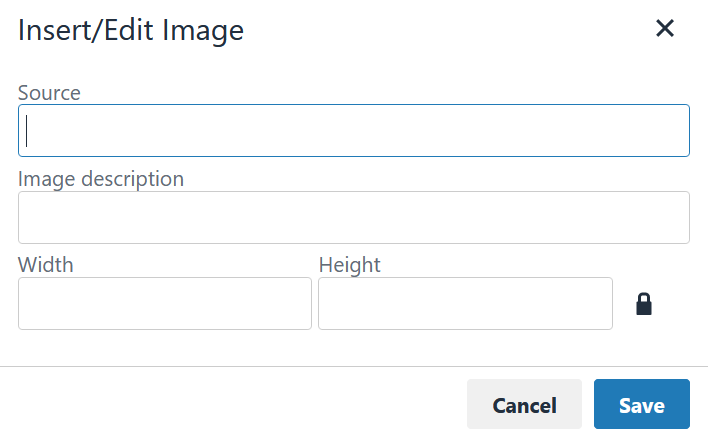
You can ignore the Image Description option, it doesn't really do anything unless the image you're trying to use doesn't work. Then it would show the Image Description as an alternative. While not necessary, it might still be a good idea to write an ID, if only for people who use screen readers or download fanfics.
What's important is the Source.
What is a Source?
A Source is the URL Ao3's HTML will use to show your image.
An example would be if you were to open an image on Discord in browser. The URL of that will be a viable Source for Ao3. However, Discord image URLs have recently become temporary, and will eventually be deleted. Any embedded images made this way will appear as a white box instead.
Finding an image hosting site can be quite difficult, as using one as a Content Delivery Network (CDN) may be against a site's TOS (like Imgur), or simply won't work with Ao3.
Fortunately I may have found a good host!
As far as I am aware, images hosted by this site will never be deleted. They will be usable forever. If that is not the case, well... I'll know, when I check my collection and there are some white boxes of mystery instead of my drawings. Then, I will update this tutorial.
If you use this site, use the Direct Link it gives you.
Source acquired! Now what?
Now you test your image!
The best way to do this is to make a Draft. At the top of Ao3's page, click on Post, then New Work.
You won't be posting this work, so don't worry about the title, fandom, ratings, or tags. Just fill in the required spaces with whatever, and don't post the Draft. You can save it as a draft by pressing the Preview button at the bottom of the editing page. After this, you can edit the Draft again and Save As Draft later.
Once your image shows up, you can then switch to the HTML editor and copy the code for your image, and paste it into the actual work or comment you want it in!
The code looks like this (excluding the + at the start):
<+img src="https://i.postimg.cc/Hxwg3WB4/a1.png" alt="Ao3 screenshot" width="500" height="202" />
Comments don't have a Rich Text editor, so this is the best way to get that image code to paste into your comment. Unless of course you have the template shown above saved elsewhere, and replace the URL and image size manually.
Keep in mind that you should consider using smaller images in comments, so you don't take up too much space.
And that is how you post images to Ao3! If you still have questions, feel free to ask. I may not be able to answer them, but I will be very happy to help if I can.
TLDR / Quick Step-by-Step
- Upload image to postimages.org
- Copy and paste image URL somewhere for safe-keeping.
- Create New Work on Ao3.
- Rich Text: Paste image URL as Source when inserting image.
- HTML: Paste image URL as Source in this template (delete +): <+img src="Source" alt="" width="100" height="100" />
- Readjust the size to the image's original size and/or dimensions.
- Save Work as Draft, DO NOT POST.
- If image works, Edit the Draft and copy the image's HTML code (looks like the provided template)
- Copy and paste code wherever on Ao3 you want to post your image
Edit November 25, 2025: It appears that guests cannot post images in comments. I have not gotten around to testing it myself yet, but if you're a guest then save yourself the trouble of testing it I suppose.
Honestly, if intentional, this is a good thing. Keeps people from posting unwanted things freely.
Use your powers for good. Keep your images SFW.
Be kind, and that kindness will return to you :3